University Course Scheduling App
Angular web app for managing university course sessions across two campuses, with role-based access for admins and students, real-time Firebase sync, instructor workload monitoring, and automatic conflict detection. 1st place in CEN333.
Overview
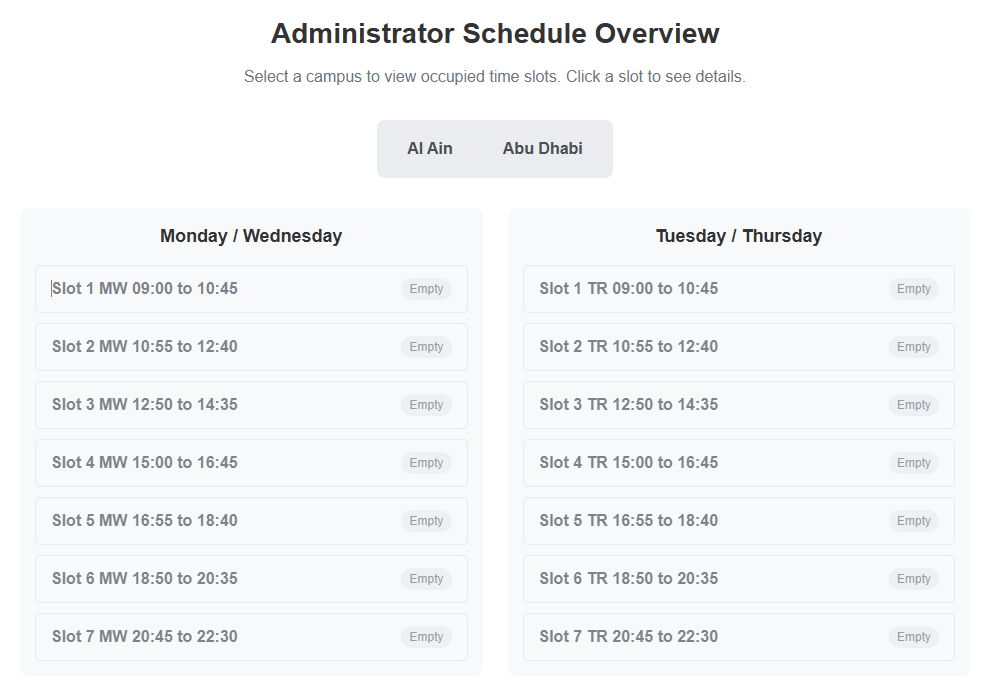
Built as part of the CEN333 course at Abu Dhabi University, this is a full-featured scheduling application for managing university courses across Abu Dhabi and Al Ain campuses. The system supports two user roles: admins get full control over session creation, deletion, schedule grid viewing, conflict detection, and instructor workload monitoring, while students can view, add, drop, and swap courses. All data syncs in real time via Firebase Realtime Database. The admin panel automatically detects conflicts like instructor double-booking or course offerings missing from one campus, and highlights instructor loads with green, yellow, and red color codes. A version comparison feature lets admins save and diff schedule snapshots over time.
The Problem
University scheduling across multiple campuses often leads to conflicts like double-booked instructors, unbalanced teaching loads, and courses missing from one campus. Without a clear system, administrative staff lose track of who is teaching what, where, and when, creating a poor experience for both staff and students.
The Solution
An Angular web application backed by Firebase Realtime Database for live data sync. A login system determines the user role and redirects accordingly. Admins get a full-featured scheduling dashboard with conflict detection, workload visualization, and version comparison. Students get a simplified course enrollment interface. All data updates reflect instantly without page refreshes.
How It Works
User logs in with university ID and password, system checks Firebase for role and redirects accordingly
Admin lands on the schedule grid view, student lands on their enrolled courses view
Admin creates sessions by selecting course code, instructor, campus, day pattern, time slot, and capacity
System checks for instructor time conflicts and cross-campus offering gaps on every update
Instructor load table calculates session counts and color-codes each: green under 4, yellow at 4, red above 4
Admin can save the current schedule as a named version and compare two versions side by side
Students browse available courses filtered by their campus and add, drop, or swap them in real time
Key Features
- Role-based auth: admin dashboard with full scheduling controls, student dashboard for course enrollment
- Admin: create and delete sessions by assigning instructor, campus, time slot, and expected capacity
- Schedule grid view showing all occupied slots across Monday/Wednesday and Tuesday/Thursday day patterns
- Automatic conflict detection for instructor double-booking and courses missing from one campus
- Instructor workload monitoring with color-coded load indicators: green (under 4), yellow (balanced), red (overloaded)
- Save and compare schedule versions to track changes between planning iterations
- Student view: browse available courses by campus, add, drop, and swap enrollments in real time
- Firebase Realtime Database for instant data sync across all sessions
- Achieved 1st place in CEN333 (Cross Platform Mobile App Development) competition at Abu Dhabi University
Technology Stack
Results
Won 1st place in the CEN333 (Cross Platform Mobile App Development) competition at Abu Dhabi University, supervised by Dr. Sajid Khawaja. All core features including login redirection, session creation, conflict detection, and student enrollment passed testing. Team: El Sayed Hesham Mowafi, Housein Hassan Kahhoul, Omar Majed Saab.